Cut continuous labels.
An automatic cutter and compatible continuous DK rolls support a cut-to-length workflow.
Manufacturer documentation ↗ · checked 2026-10-13Research and retailer links cover US models. Check local availability and the exact regional variant before buying.
BROTHER / THE CUT-TO-LENGTH DESK
Plan shipping and cut-to-length labels at one computer desk.
You need shipping labels and other label lengths, and can build your supply choices around Brother’s DK system.
Before you choose: A direct iPhone route is unverified. Budget for compatible DK rolls. Sources
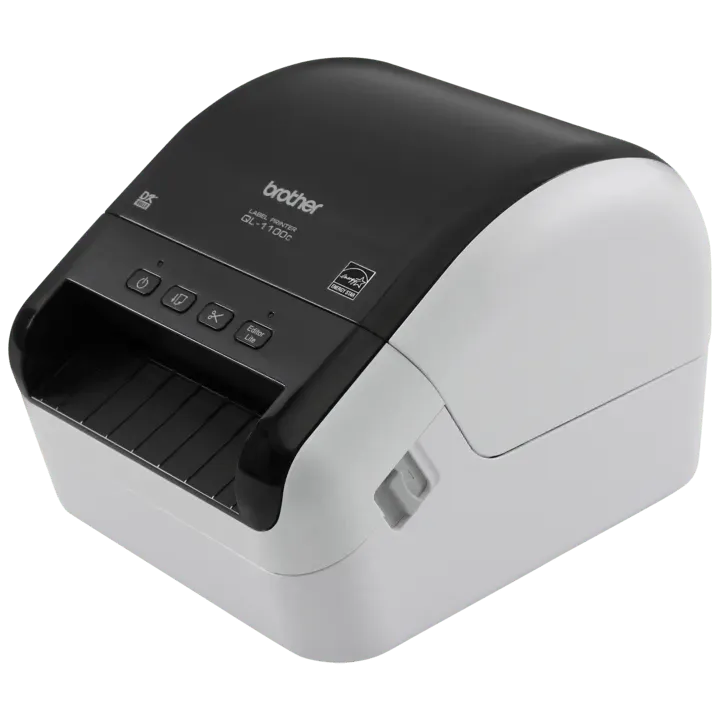 Manufacturer image · BrotherNot our own test photo. Pictured accessories may be sold separately.
Shortlist it for both shipping and varied-length labels. Price the correct DK supplies, not an unrelated pack of fanfold labels.
Check the exact US model, current software and compatible label supply. A translated page does not establish local availability or an identical regional variant.
Sources · 2026-10-13 · See buying optionsAn automatic cutter and compatible continuous DK rolls support a cut-to-length workflow.
Manufacturer documentation ↗ · checked 2026-10-13The documented Mac and Windows route uses USB and P-touch Editor. Check current OS downloads.
Manufacturer documentation ↗ · checked 2026-10-13The label system uses DK pre-sized and continuous rolls; generic fanfold pricing is not a valid supply assumption.
Manufacturer documentation ↗ · checked 2026-10-13PLAN THE WHOLE SETUP
A shopping checklist. These items are not a claim about what any retailer includes.
| Exact model | QL-1100C |
|---|---|
| Selected US identifier | QL1100C |
| Print method | Direct thermal |
| Resolution | 300 dpi · manufacturer specification |
| Media / print width | Up to 4.09 in media / 4 in print |
| Label system | Brother DK pre-sized and continuous rolls |
| Automatic cutter | Documented automatic cutter |
| Current price / stock | See buying options for verified eBay listings. Retailer checkout confirms final price and stock. |
No verified direct iPhone/AirPrint route for this C model.
iPrint&Label using a separately purchased compatible USB-to-go cable.
USB and P-touch Editor; check current downloads for your macOS version.
USB and P-touch Editor; Automatic Crop and Plug & Label are Windows-specific.
A documented route is not a guarantee for every OS version, app or label size. Confirm your exact combination before buying.
START WITH YOUR DAY
Choose your situation to explore printer routes, purchase checks and a practical guide.
No verified direct iPhone/AirPrint route for this C model. Check the exact app, OS and label size against the dated sources.
Brother DK pre-sized and continuous rolls. Documented media / print width: Up to 4.09 in media / 4 in print. A width specification does not confirm every template or device route. See the manufacturer documentation and check dates.
Start with one actual shipping-label file from your platform. Confirm its export format, dimensions and the supported print route for your device. A printable PDF does not establish a native platform integration.
No. These buying notes interpret manufacturer and support documentation checked on 2026-10-13. We have not measured setup time, reliability, print quality or time savings. How we research printers.
A DIFFERENT ROUTE?
Editorial shortlists by workflow, not a ranking, tested recommendation or price comparison.
For a connected DK-label workflow with automatic cutting.
Brother DK pre-sized and continuous rolls · Sources checked 2026-10-13
Compare with Brother QL-1100C ↗Compare a different USB/LAN label system; authentic DYMO labels are required.
Authentic compatible DYMO LW labels required · Sources checked 2026-10-13
Compare with Brother QL-1100C ↗TRACEABLE, NOT TAKEN ON TRUST
Manufacturer documentation is evidence of specifications, not an independent performance test.